
The quote says 120. Why does the purchase order say 150?
A purchasing team has two Excel workbooks and needs to check what changed before approving an order. In this OrderCheck sample, matching by part number finds four differences across six parts. One of them, PIN-208, adds KRW 63,000 to that line.
Reproduce the comparison
- Open OrderCheck in English and choose Try sample. The built-in quote and purchase order open together. You can use the sample without signing in.
- Select Differences. Of six distinct part numbers, four need a look. BRK-104 and PIN-208 appear in both files with changes. BKT-420 appears only in the quote and SHM-610 only in the purchase order.
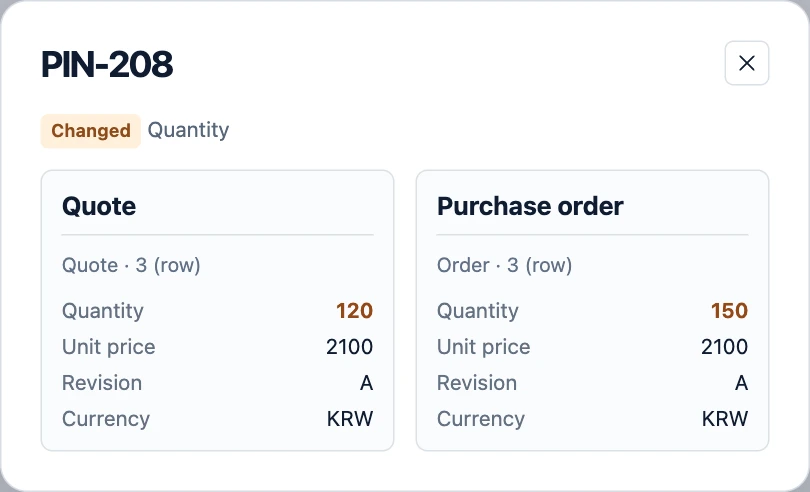
- In the PIN-208 row, select the arrow labeled View source rows. The detail opens both original sheet names, row numbers and values.
Check the two original rows
| Sheet and row | Quantity | Unit price | Revision |
|---|---|---|---|
| Quote · row 3 | 120 | KRW 2,100 | A |
| Order · row 3 | 150 | KRW 2,100 | A |
The unit price is KRW 2,100 and the drawing revision is A on both sides. The quote line is 120 × 2,100 = KRW 252,000. The purchase order line is 150 × 2,100 = KRW 315,000. The extra 30 units account for the full KRW 63,000 difference.
What to ask before approval
“The order increases PIN-208 by 30 units at the quoted price. Can you confirm that 150 is the approved quantity for row 3?” If the buyer confirms the change, export the comparison with Export Excel and keep the answer with the purchase order.
Use your own workbooks
Choose one unencrypted .xlsx quote and one .xlsx purchase order, up to 25 MiB each. Select one worksheet from each workbook and identify the part number, quantity and unit price columns. For part numbers such as 0017, store the code as text so its leading zeros are present in the file.
Verify your email to compare and export your first file pair for free. The same pair can be opened again. A different pair requires a one-time, single-user purchase. For scans or PDFs, prepare the two XLSX workbooks first.